Photoshop help?
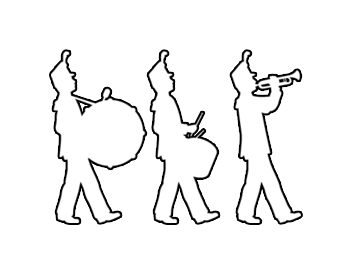
I need some help. I want to take this image and fine tune it for a shirt. I want to make the image white, with a black outline. I still want the background to be transparent. If anyone could show me how to do this, I would appreciate it.
-Aaron
Observing members:
0 Composing members:
0
Composing members:
0
17 Answers

Hmm..tried to open the image in photoshop but it just came out black…but I’ll do the best I can to walk you though it.
1) Making the background transparent: Select>Color Range then click the any white part of your image and press ok. All the white parts of your image should be selected. Press [Delete] now to clear the white background
2) Making the outline: Select>Color Range the click any black part of your image and press ok. Now go to Select > Modify > Contract and enter the number of pixels you want the border to be (I did 3px). Press ok. Then press [Delete] to clear the insides. Now use the paint bucket/fill thing to fill all the spaces in with white.
I’m no expert on photoshop, so maybe you want to look at other people’s answers, but this is how I did it.
@FrogOnFire
Before I try that:
The file was originally a .png, but upon uploading it, I think it was renamed to a .jpg. Maybe try changing the extension?

Open the photo in photoshop (change the extension to .png, since it’s a PNG image that someone decided to rename as a .jpg, and that will confuse PhotoShop)
Use the wand tool to select the left most black image, hold shift and use it to select the middle and then the right image as well. All three should now be selected.
Make sure your colors selected are black/white by clicking the little black/white icon next to the colors on the bottom of the toolbar. Reverse the colors by clicking the arrow, so that it’s white/black.
Click the paintbbucket tool and fill each of the black shapes to be white instead of black.
Create a new layer
Click the Paths tab and create a new path. Then click the “new path from selection” button right to the left of the new path button.
Right click on the new work path, select “stroke path”, and choose either the pencil or the brush tool.
Save your new image.

Well, This didn’t turn out well.

One simple way would be to invert the image (command i) then right click the layer, go to blending options, and hit “stoke” at the bottom.
@MrItty: I’m trying that now.
@johnpowell: A for effort, that’s the general look I’m shooting for.
MrItty, that looks far better than mine :)
Yeah…I got past the png thing and tried my own advice…it doesn’t look as great as I thought.
Do you have Adobe Illustrator? That’s probably the best program to use here, since the png is pretty low-resolution, especially for a t-shirt. You could Live Trace it in Illustrator, then set all the shapes to no fill, and make them have a black outline. Then you’ll have a high-quality vector image.

All you need to do is duplicate the layer, invert it, and use it as a layer mask. It’s already black and white, so inverting it will make the white completely opaque and the black completely transparent.
edit: spelling

Filter->Stylize->Find Edges yields this.
Thanks to everybody for all the help. I really appreciate it. The shirts, which if you haven’t figured out by now, are for my high school drumline. I’m sure they’re gonna turn out awesome.
Now the hard part. Is anyone good with the pen tool in illustrator. Lets get this mofo rasterized. And clean up the missing parts.
@johnpowell You don’t need the pen tool. See my post above. Just live trace it and set it no fill and black outline.

You might wanna trace it in illustrator.
that way it’ll be ready for printing and you can finish the boots at the bottom end.
it’s really simple.
I might have some time this Saturday to do it for you if you like.
Answer this question 
This question is in the General Section. Responses must be helpful and on-topic.



 Composing members:
0
Composing members:
0